ICC Color Management
by JonKung
About ICC Color Management
Instrument measurements and color characterization using spectrophotometer and the ICC method is a fast and simple way to attain precise color communication or exchanges between color devices. In fact ICC standard (ISO 15076) is de facto nowadays for color exchanges between devices and supported by all leading vendors http://www.color.org/memberlist2.html . ICC workflow enables service bureaus to accurately and efficiently communicate and control its output colors — in short WYSIWYG — as well as thorough quality analysis of the various ink,.media, printer, halftones and RIP software settings both visually and quantitatively by studying the images on screen. Accurately characterized ICC profiles can tell many things about the printing system such as a) color or tonal resolution, b) uniformity at various parts of the color and brightness gradients c) overall color gamut d) color gamut and tonal smoothness esp. at the extreme shadow and highlights region e) gray balance f) metamerism index (color stability to different illumination sources) These printing quality criteria can be affected either by one or combinations of these following: 1) quality of the RIP software 2) quality of the calibration 3) paper 4) ink 5) resolution 6) halftone algorithms 7) printer itself 8) black generation algorithms 9) ink limit
Hence what shown here is that good ICC profiles not only allow us to maximize the print system to its fullest capable potential but also provides us with foreknowledge of its maximum attainable printing quality and limitations from this particular setup and information on which component to adjust or replace to further improved on the print quality.
Mechanics of ICC Profile and How It Color Manage
ICC color profiling is color characterization of the color device itself. Every Printer/Media ICC profile has its own unique color lookup tables(CLUTs) that translate all the meaningless RGB/CMYK color combinations into quantifiable CIE color units eg. CIELab color units. Simple analogy is pixels to inches. However in colors these RGB/CMYK values may not necessarily be linear or to say each individual pixels may not have equal or predictable lengths therefore each of these has to be individually measured to map them all to CIELab color units accurately or at least do a sampling. With this we now know how it map any unknown RGB to unknown CMYK and vice versa with the CIELab as go-between. In ICC profile this go-between is termed as Profile Connection Space (PCS) which only with it will allow meaningful color conversions to take place e.g. video display to printer and vice versa. The color engine that do this mapping called CMM (Color Management Module). In Adobe software it uses the Adobe (Ace) CMM while in Windows OS and other graphics software such as Corel or Macromedia uses the Microsoft ICM developed by Kodak. Other software may have its own unique CMMs as well.
The tables in the ICC profile that stored this color mapping data are called CLUTs (Color Look-up Tables). Each ICC profile representing the color characteristics of a device stores two sets of three CLUTs. First set of three maps the RGB/CMYK values to PCS while the second set maps the PCS back to RGB/CMYK values. For color converstion to take place between two different color devices it needs the CLUTs of the two ICC profiles. That is first set of ICC profile1 to the second set ICC profile2 or RGB/CMYK to PCS of ICC profile1 to PCS to RGB/CMYK of ICC profile2.
In ICC standards there are four types of color conversions methods (Rendering Intents) and each mapping method requires a CLUTs from each of the two ICC profiles however Absolute and Relative mapping both use the same pair except for the white point tag from ICC profile1 and that’s why we only have two sets of three CLUTs in each ICC profile. The four mapping methods are: a) Perceptual Rendering Intent (RGB/CMYK0 -> PCS0 table of ICC profile1 to PCS0 -> RGB/CMYK0 table of ICC profile2) b) Absolute Rendering Intent (RGB/CMYK1 -> PCS1 table of ICC profile1 to PCS1 -> RGB/CMYK1 table of ICC profile2) c) Relative Rendering Intent (RGB/CMYK1 -> PCS1 table of ICC profile1 to mathematically modified PCS1 -> RGB/CMYK1 of ICC profile2) mathematical modification of the CLUT depends on the info in White Point tag of ICC profile1. If ICC profile1 and ICC profile2 has same white point then Relative Rendering Intent is same as Absolute Rendering Intent d) Saturation Rendering Intent (RGB/CMYK2 -> PCS2 table of ICC profile1 to PCS2 -> CMYK2 table of ICC profile2).
Please refer to Adobe Photoshop Help on Rendering Intents for understanding on how it affects the color conversion visually.
Some Useful Features and Possibilities with ICC Color Managed Workflow
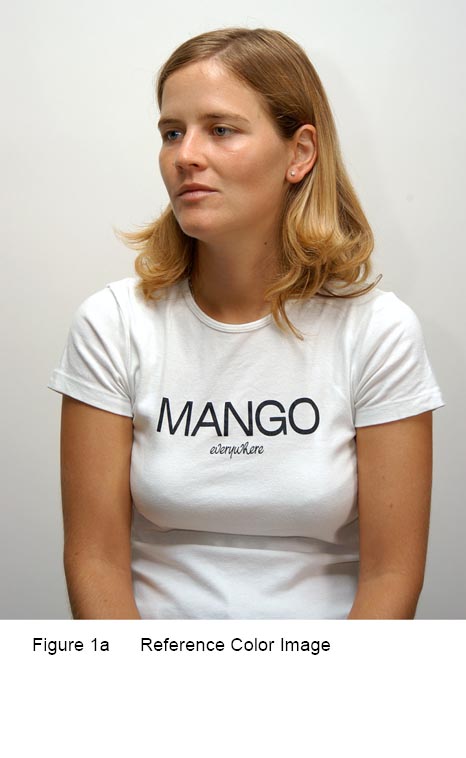
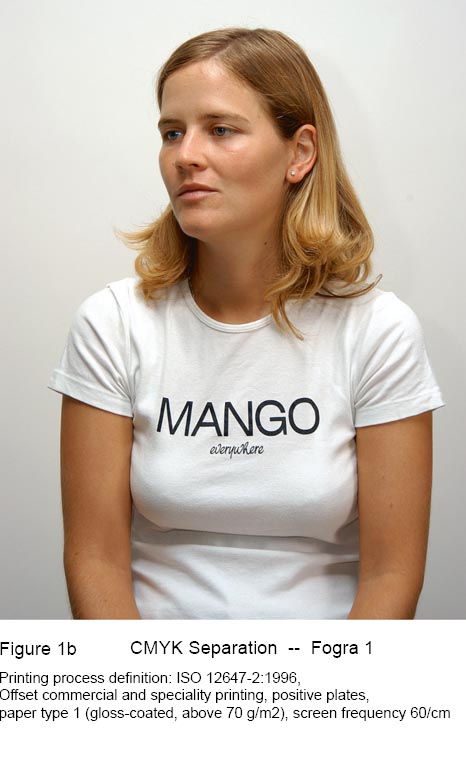
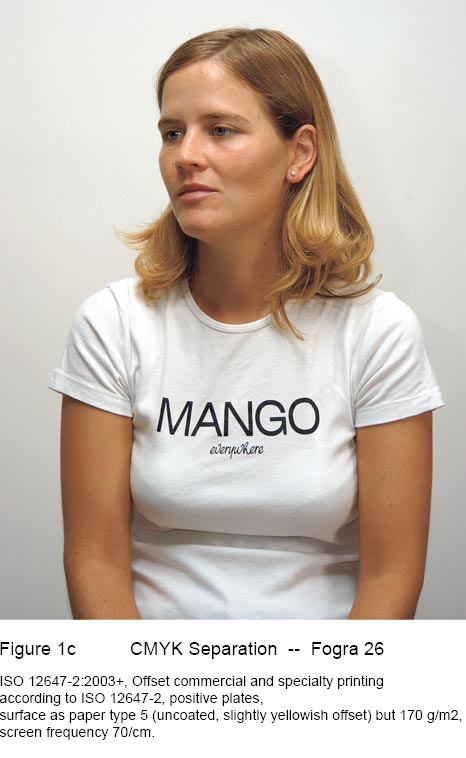
1) Faithful Tone and Color Reproduction of the Original Source (Film Scans, Digital Camera Sources and Graphics Designs) to Simulation on Display or Proofer to Output on Print
Faithful source reproduction on print visually means: 1) color will be more natural and true-to-life 2) good gray balance 3) more color details esp. in the shadows and highlights 4) more perception of depth .

2) Quantifiable Colors and Lightness Values
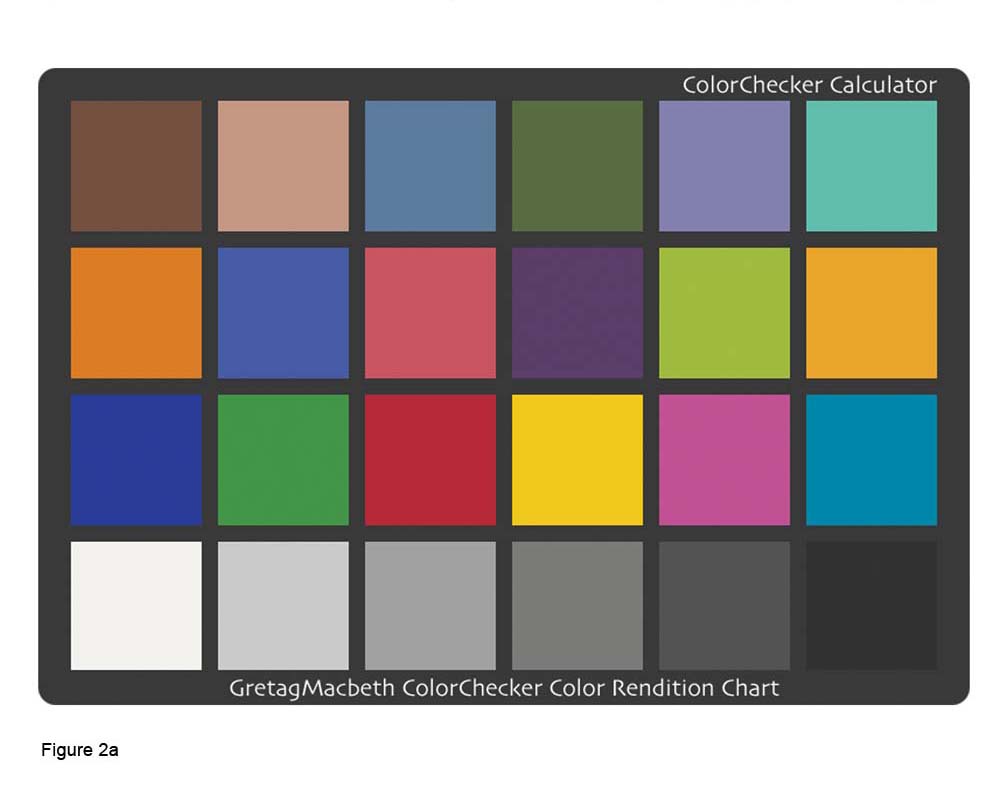
Main objective of ICC color management is to faithfully and consistently recreate all the colors specified in a computer file to all different output devices. In a properly calibrated system, this is achievable and accuracy are within tolerance. Colors are made quantifiable by the CIE. If we have ‘meter’ as the standard unit for distance, in colors for the Graphics and Arts industry we have the CIELab. Color can also be quantified in various ways depending on its application uses such as Device Dependent RGB, HSB, Device Dependent CMYK, XYZ, CIELuv and CIELab. which are all mathematically interchangeable such as centimeters to inches to feet to yards and to meters.
3) Color Proofing
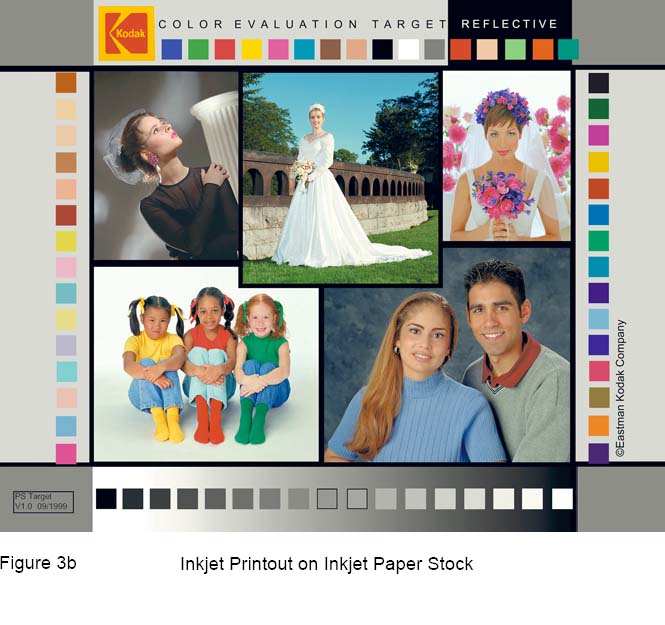
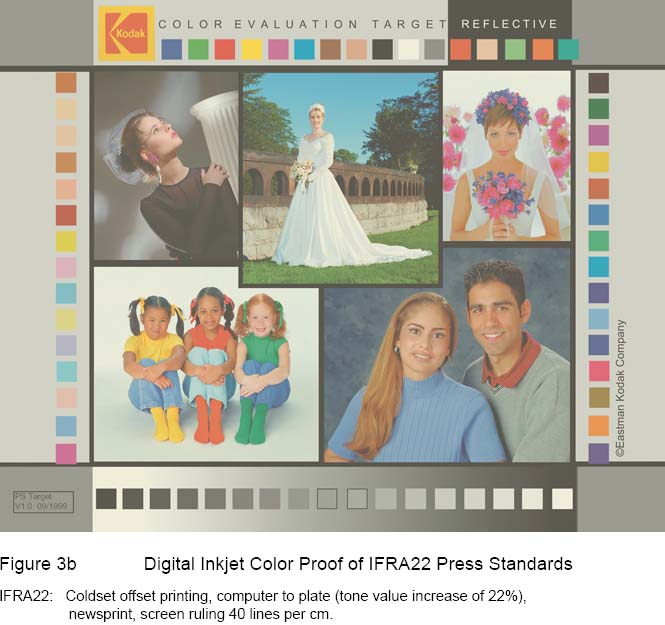
With suitable printer, ink and paper combined with proper calibration and characterization and ICC color management workflow, color devices such as inkjets or lasers can be made into ISO 12647 certified color proofers to accurately simulate the printing color characteristics of other ISO print standards such as those SWOP, FOGRA, IFRA, GRACOL etc. or other ISO 12647 print processes such as Gravure, Screen, Flexo and etc.
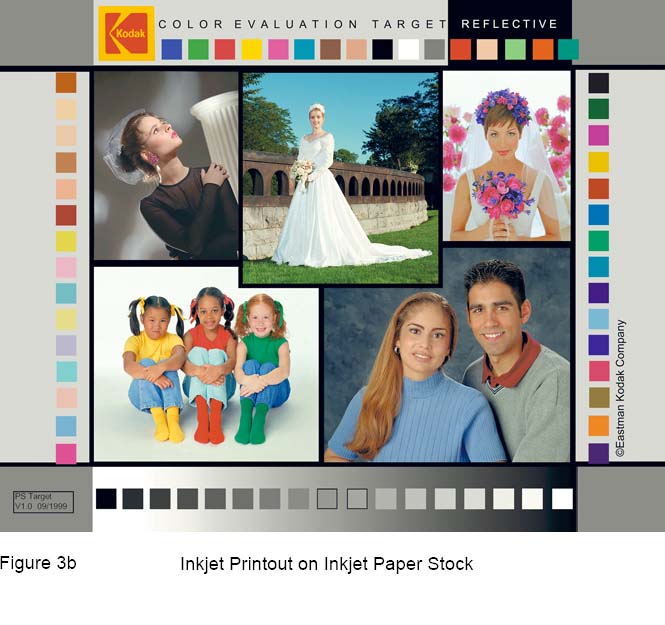
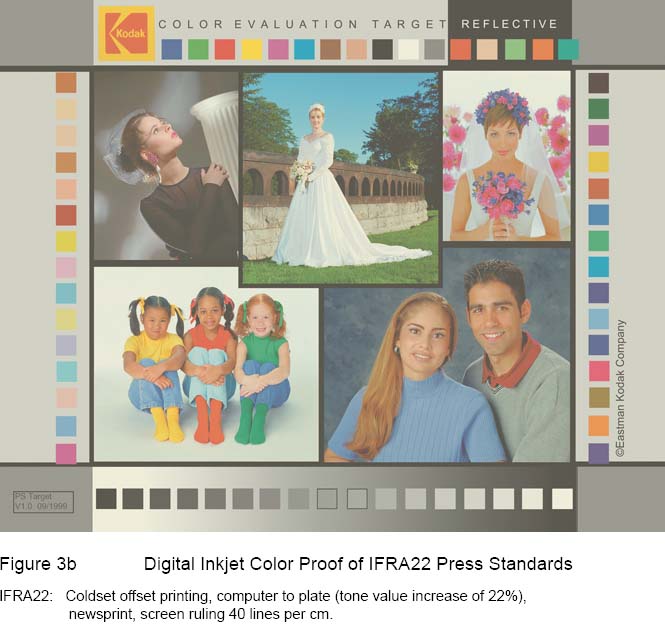
4) Total Ink Limit, Black Ink Limit, Defining Black Point Color, UCR/GCR Control
With customizable Total Ink Limit, Black Ink Limit, UCR/GCR and Black Point users have both their production costs and print quality optimised.
The Total Ink Limit in the ICC profile defines the maximum allowable ink amount for output. Depending on paper types and print processes ideal Total Ink Limit can be range from 260% and 400%. This value is obtained by analyzing calibration targets based on image sharpness.
Black Ink Limit defines the maximum Black Limit. It is usually set to less than 100% to reduce the posterization effects of the shadow portion of a linearized K channel.
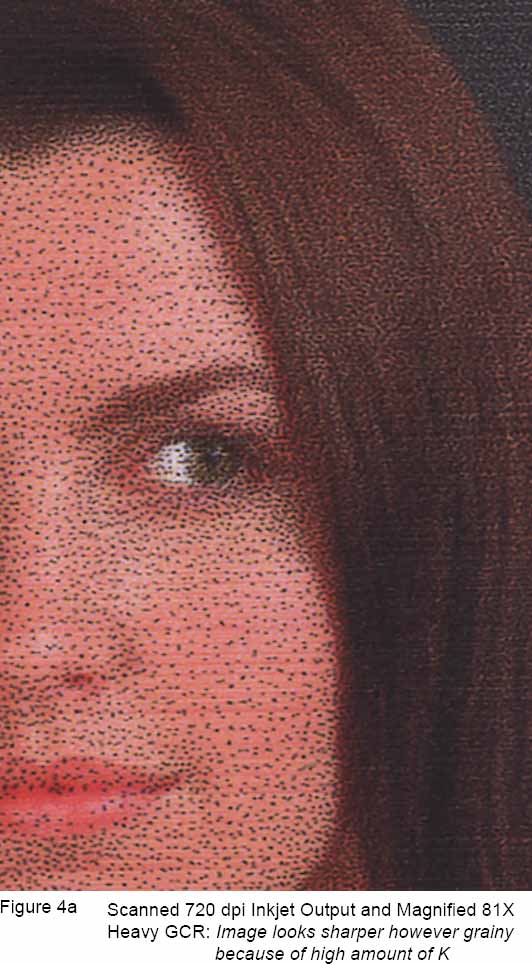
UCR is Under Color Removal and GCR is Gray Component Replacement. Both functions are to replace some equal parts of the CMY inks with K (black). The differences between UCR and GCR is that UCR replaces some CMY inks that are concentrated in the shadows regions but gradually stop at the middle tones and highlights; while GCR replaces some CMY inks in the regions that includes the shadows, middle tones and highlights. A finely crafted UCR/GCR curve should have these following results: 1) rich shadows for images 2) black text and vector graphics are sharp and crisp even in CMYK rich black 3) eliminate the effects ink metamerism particularly with pigment inks — greenish appearance of neutral CMY when viewed under illuminants such as fluorescent lights.
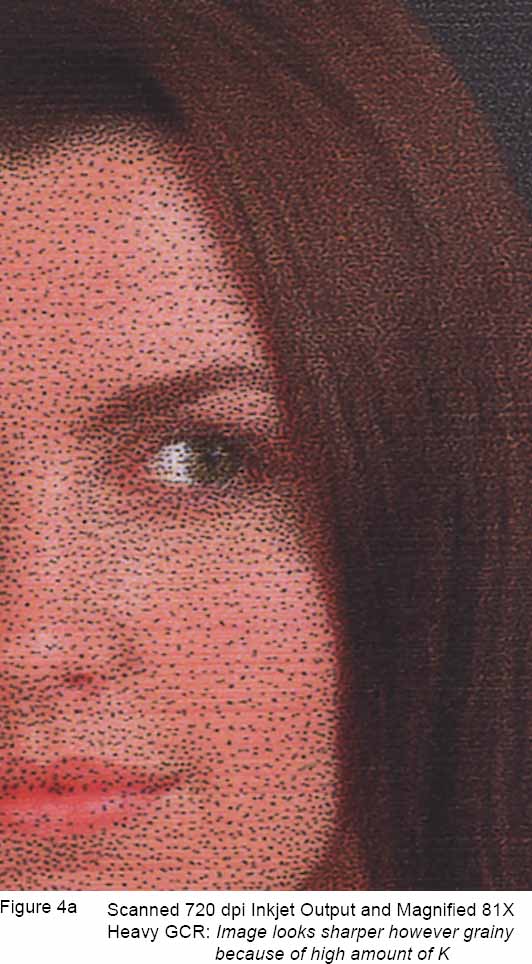

5) Color Gamut Evaluating
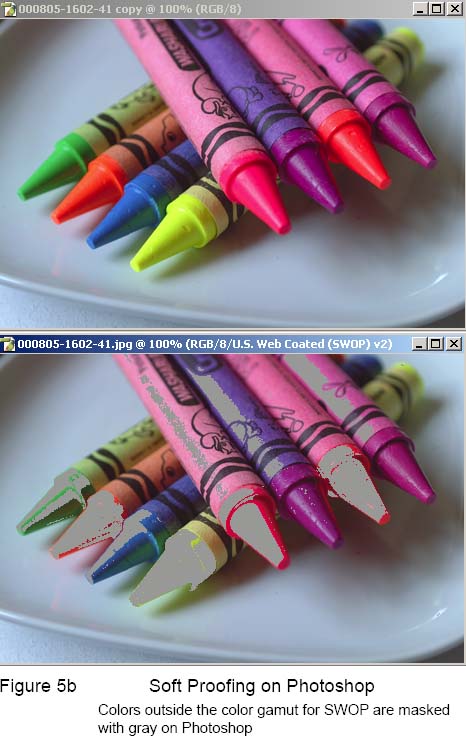
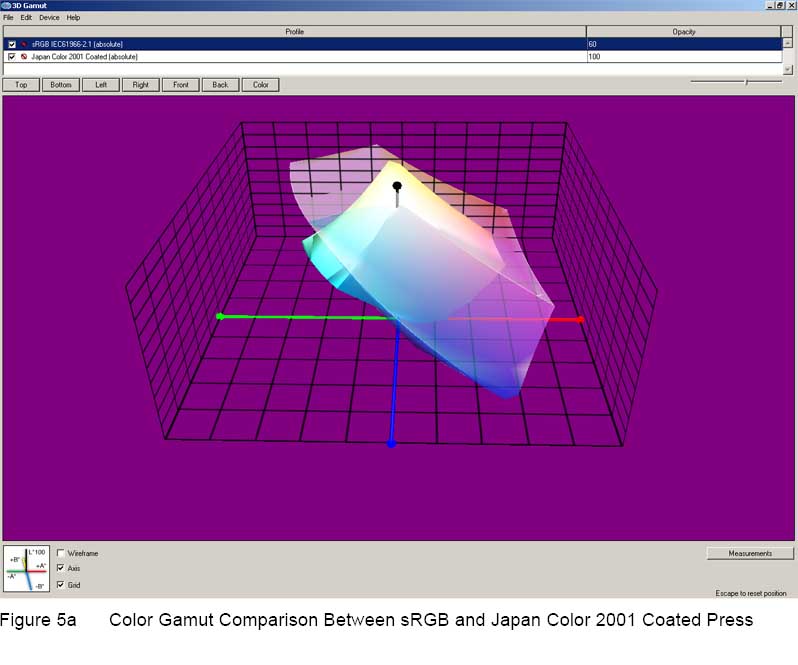
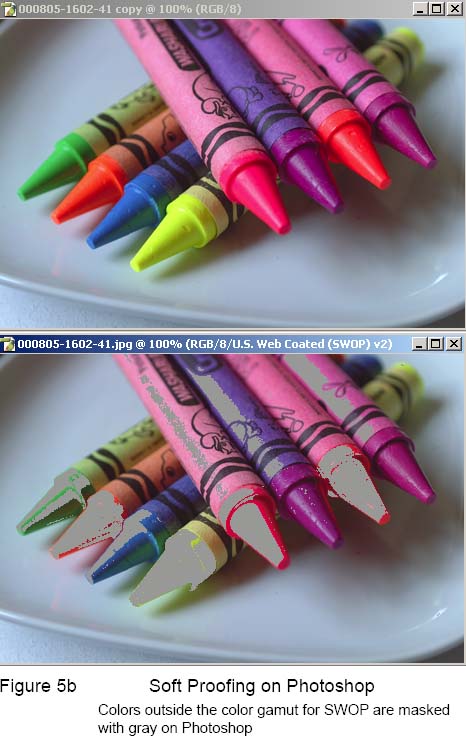
The outline and shape of the color gamut is encoded in the ‘gamut table’ of the ICC profile. The 2D or 3D gamut shown in CIELab model or sometimes CIE xyY model, describe the latitude of colors and brightness that an output device can display or print. Evaluating device color gamut allows user to know which ink, paper and halftone combo have the widest possible colors for the image to be printed or to take remedial actions to some out-of-gamut colors by choosing a more suitable colorimetric rendering intent or manually adjusting the brightness and saturation to make it fit into the gamut before final production run.
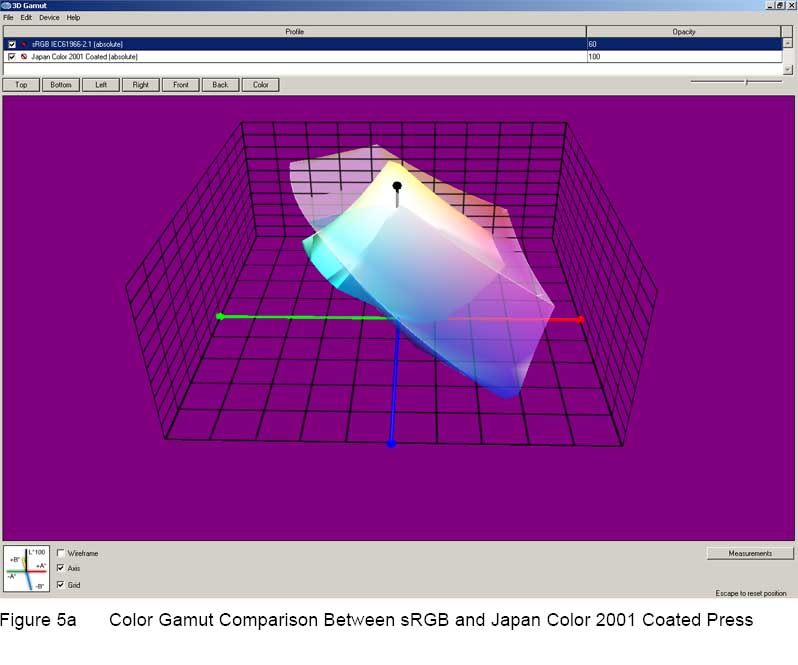
6) Perceptual Rendering Function
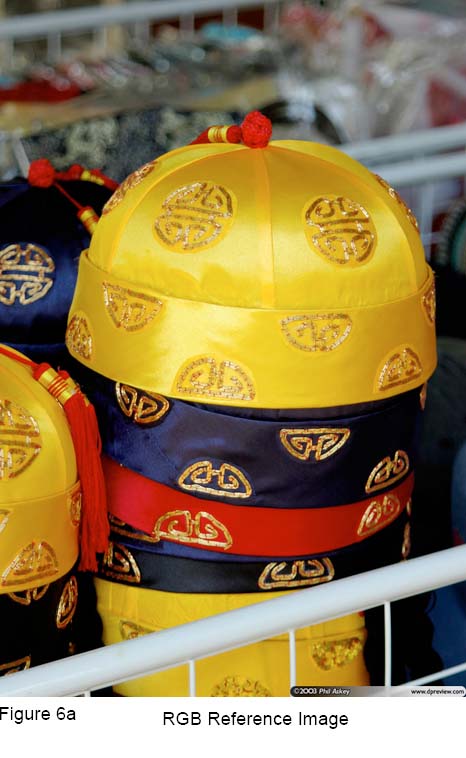
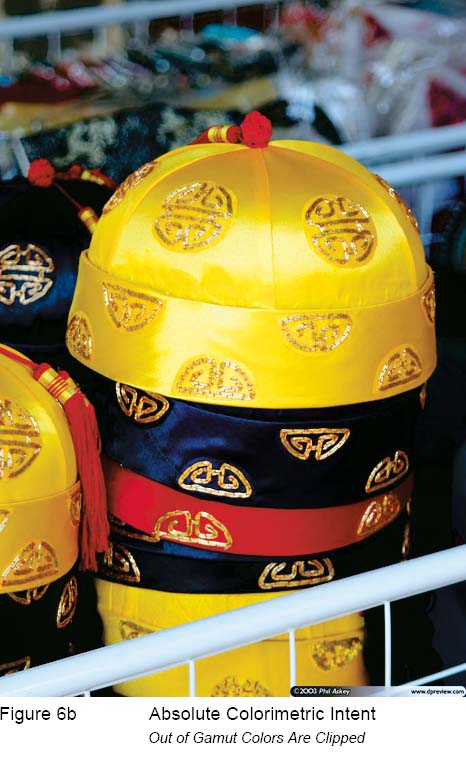
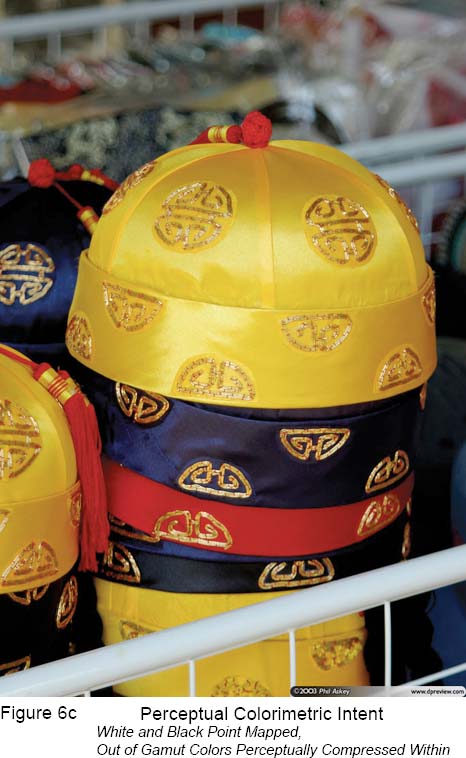
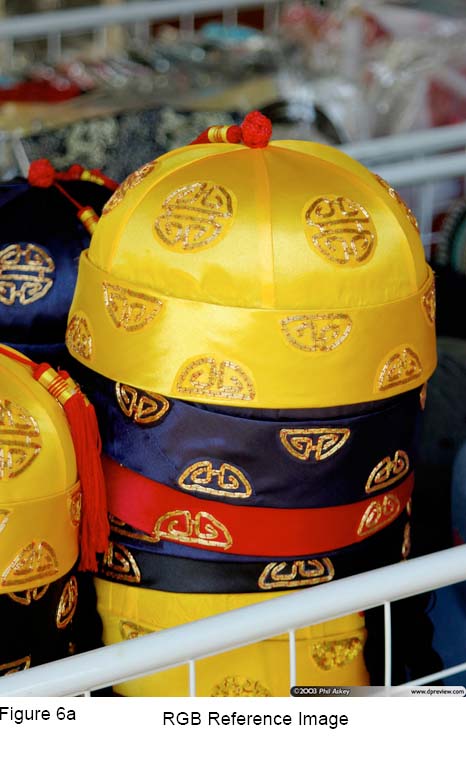
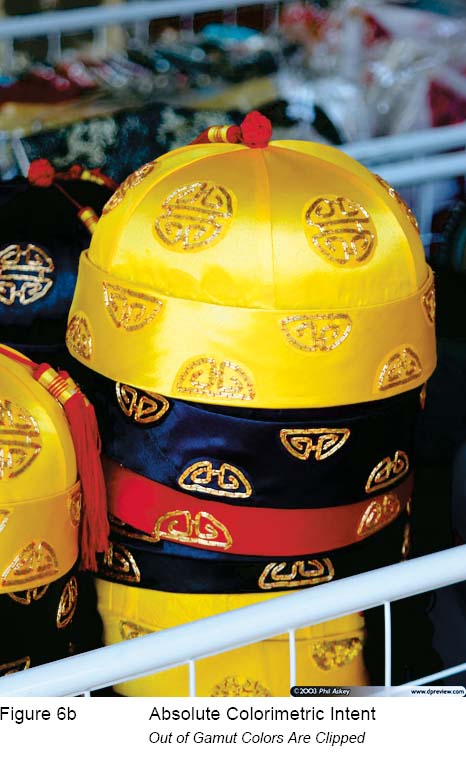
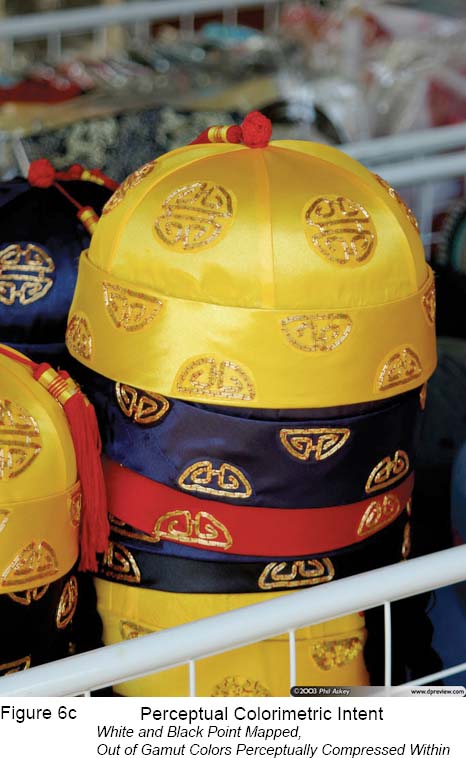
Another important aspect of ICC color management is the Perceptual Rendering. It is a gamut mapping technique where the 3D color gamut and vertices (white points and black points) of the source space (camera/ scanner/ RGB color space) are mapped into the smaller 3D color gamut of the destination space (media/printer CMYK color space This approach is chosen when the color space of the source is much larger than the destination and the perceptual relationship of out-of-gamut colors have to be preserved. Depending on the look up tables of the ICC profiles this approach typically preserves the hue and perceptually mapped the contrast and saturation inside the destination space to preserve its color relationship relative to the source. Source images of high brightness and high saturation to be replicated on low brightness and low saturation paper stocks such as newsprint materials are recommended to use the Perceptual Rendering to avoid color clippings at the bright and saturated color boundaries. Compare this with the dynamic range of an orchestral recording where the sound level may well exceeds a typical home stereo system. So instead of turning up the volume to reproduce the sound levels heard on the orchestra and get nastily distorted what is needed is lower the volume to the range the stereo system is capable and preserve the pitch and harmonics of the recording. This principle is similarly applied also for visual colors. With current ICC standards there are four major color mapping techniques to choose: 1) Absolute, 2) Relative 3) Saturation 4) Perceptual with custom tweaks such as defining gray balance — paper relative or absolute, defining black and white point color etc. These mappings techniques which is based on visual science theories are needed: to maximize the use of the currently available color gamut for the industry, to eliminate the ugly color clipping in some parts of the images and even to trick the brain into seeing more colors than which is actually there!
ICC Color Management
by JonKung
About ICC Color Management
Instrument measurements and color characterization using spectrophotometer and the ICC method is a fast and simple way to attain precise color communication or exchanges between color devices. In fact ICC standard (ISO 15076) is de facto nowadays for color exchanges between devices and supported by all leading vendors http://www.color.org/memberlist2.html . ICC workflow enables service bureaus to accurately and efficiently communicate and control its output colors — in short WYSIWYG — as well as thorough quality analysis of the various ink,.media, printer, halftones and RIP software settings both visually and quantitatively by studying the images on screen. Accurately characterized ICC profiles can tell many things about the printing system such as a) color or tonal resolution, b) uniformity at various parts of the color and brightness gradients c) overall color gamut d) color gamut and tonal smoothness esp. at the extreme shadow and highlights region e) gray balance f) metamerism index (color stability to different illumination sources) These printing quality criteria can be affected either by one or combinations of these following: 1) quality of the RIP software 2) quality of the calibration 3) paper 4) ink 5) resolution 6) halftone algorithms 7) printer itself 8) black generation algorithms 9) ink limit
Hence what shown here is that good ICC profiles not only allow us to maximize the print system to its fullest capable potential but also provides us with foreknowledge of its maximum attainable printing quality and limitations from this particular setup and information on which component to adjust or replace to further improved on the print quality.
Mechanics of ICC Profile and How It Color Manage
ICC color profiling is color characterization of the color device itself. Every Printer/Media ICC profile has its own unique color lookup tables(CLUTs) that translate all the meaningless RGB/CMYK color combinations into quantifiable CIE color units eg. CIELab color units. Simple analogy is pixels to inches. However in colors these RGB/CMYK values may not necessarily be linear or to say each individual pixels may not have equal or predictable lengths therefore each of these has to be individually measured to map them all to CIELab color units accurately or at least do a sampling. With this we now know how it map any unknown RGB to unknown CMYK and vice versa with the CIELab as go-between. In ICC profile this go-between is termed as Profile Connection Space (PCS) which only with it will allow meaningful color conversions to take place e.g. video display to printer and vice versa. The color engine that do this mapping called CMM (Color Management Module). In Adobe software it uses the Adobe (Ace) CMM while in Windows OS and other graphics software such as Corel or Macromedia uses the Microsoft ICM developed by Kodak. Other software may have its own unique CMMs as well.
The tables in the ICC profile that stored this color mapping data are called CLUTs (Color Look-up Tables). Each ICC profile representing the color characteristics of a device stores two sets of three CLUTs. First set of three maps the RGB/CMYK values to PCS while the second set maps the PCS back to RGB/CMYK values. For color converstion to take place between two different color devices it needs the CLUTs of the two ICC profiles. That is first set of ICC profile1 to the second set ICC profile2 or RGB/CMYK to PCS of ICC profile1 to PCS to RGB/CMYK of ICC profile2.
In ICC standards there are four types of color conversions methods (Rendering Intents) and each mapping method requires a CLUTs from each of the two ICC profiles however Absolute and Relative mapping both use the same pair except for the white point tag from ICC profile1 and that’s why we only have two sets of three CLUTs in each ICC profile. The four mapping methods are: a) Perceptual Rendering Intent (RGB/CMYK0 -> PCS0 table of ICC profile1 to PCS0 -> RGB/CMYK0 table of ICC profile2) b) Absolute Rendering Intent (RGB/CMYK1 -> PCS1 table of ICC profile1 to PCS1 -> RGB/CMYK1 table of ICC profile2) c) Relative Rendering Intent (RGB/CMYK1 -> PCS1 table of ICC profile1 to mathematically modified PCS1 -> RGB/CMYK1 of ICC profile2) mathematical modification of the CLUT depends on the info in White Point tag of ICC profile1. If ICC profile1 and ICC profile2 has same white point then Relative Rendering Intent is same as Absolute Rendering Intent d) Saturation Rendering Intent (RGB/CMYK2 -> PCS2 table of ICC profile1 to PCS2 -> CMYK2 table of ICC profile2).
Please refer to Adobe Photoshop Help on Rendering Intents for understanding on how it affects the color conversion visually.
Some Useful Features and Possibilities with ICC Color Managed Workflow
1) Faithful Tone and Color Reproduction of the Original Source (Film Scans, Digital Camera Sources and Graphics Designs) to Simulation on Display or Proofer to Output on Print
Faithful source reproduction on print visually means: 1) color will be more natural and true-to-life 2) good gray balance 3) more color details esp. in the shadows and highlights 4) more perception of depth .
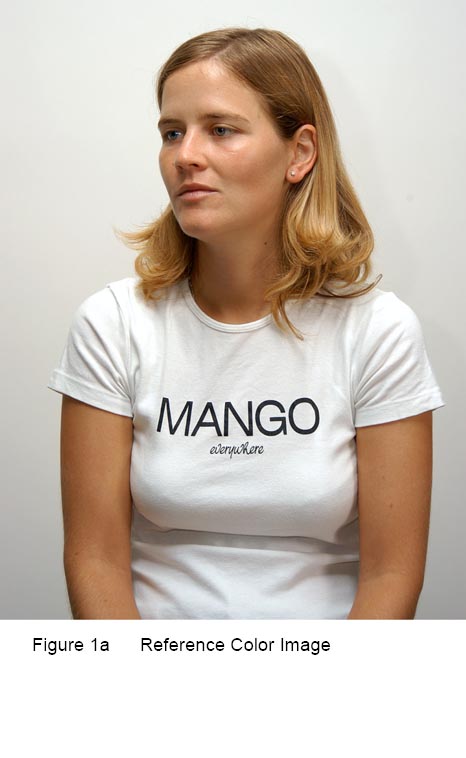
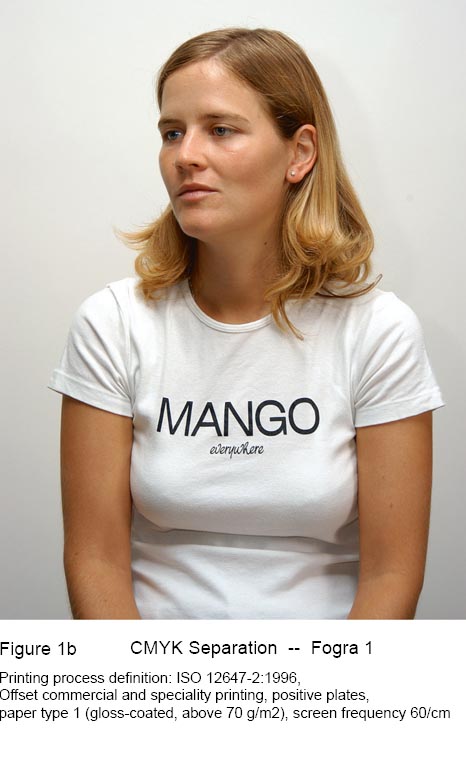
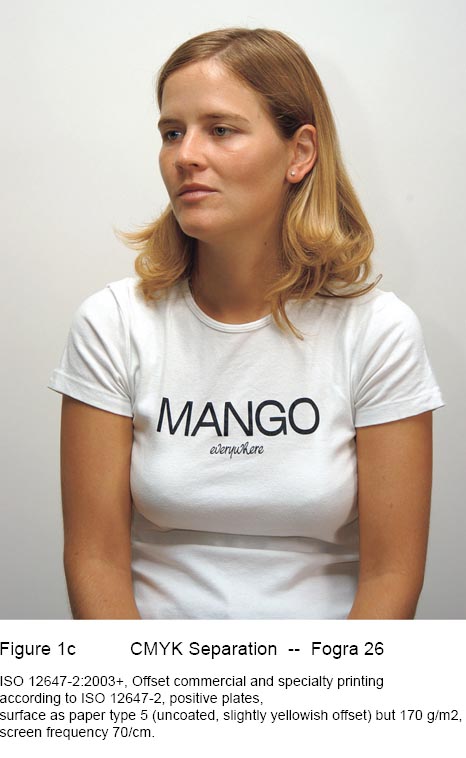

2) Quantifiable Colors and Lightness Values
Main objective of ICC color management is to faithfully and consistently recreate all the colors specified in a computer file to all different output devices. In a properly calibrated system, this is achievable and accuracy are within tolerance. Colors are made quantifiable by the CIE. If we have ‘meter’ as the standard unit for distance, in colors for the Graphics and Arts industry we have the CIELab. Color can also be quantified in various ways depending on its application uses such as Device Dependent RGB, HSB, Device Dependent CMYK, XYZ, CIELuv and CIELab. which are all mathematically interchangeable such as centimeters to inches to feet to yards and to meters.
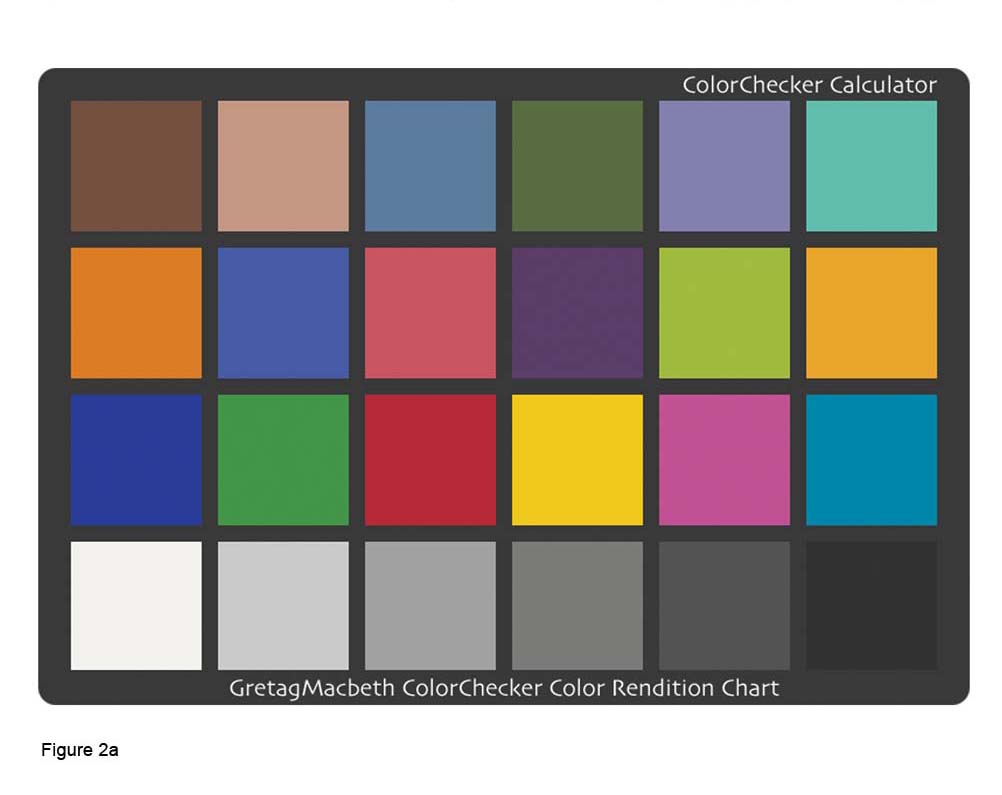
3) Color Proofing
With suitable printer, ink and paper combined with proper calibration and characterization and ICC color management workflow, color devices such as inkjets or lasers can be made into ISO 12647 certified color proofers to accurately simulate the printing color characteristics of other ISO print standards such as those SWOP, FOGRA, IFRA, GRACOL etc. or other ISO 12647 print processes such as Gravure, Screen, Flexo and etc.
4) Total Ink Limit, Black Ink Limit, Defining Black Point Color, UCR/GCR Control
With customizable Total Ink Limit, Black Ink Limit, UCR/GCR and Black Point users have both their production costs and print quality optimised.
The Total Ink Limit in the ICC profile defines the maximum allowable ink amount for output. Depending on paper types and print processes ideal Total Ink Limit can be range from 260% and 400%. This value is obtained by analyzing calibration targets based on image sharpness.
Black Ink Limit defines the maximum Black Limit. It is usually set to less than 100% to reduce the posterization effects of the shadow portion of a linearized K channel.
UCR is Under Color Removal and GCR is Gray Component Replacement. Both functions are to replace some equal parts of the CMY inks with K (black). The differences between UCR and GCR is that UCR replaces some CMY inks that are concentrated in the shadows regions but gradually stop at the middle tones and highlights; while GCR replaces some CMY inks in the regions that includes the shadows, middle tones and highlights. A finely crafted UCR/GCR curve should have these following results: 1) rich shadows for images 2) black text and vector graphics are sharp and crisp even in CMYK rich black 3) eliminate the effects ink metamerism particularly with pigment inks — greenish appearance of neutral CMY when viewed under illuminants such as fluorescent lights.

5) Color Gamut Evaluating
The outline and shape of the color gamut is encoded in the ‘gamut table’ of the ICC profile. The 2D or 3D gamut shown in CIELab model or sometimes CIE xyY model, describe the latitude of colors and brightness that an output device can display or print. Evaluating device color gamut allows user to know which ink, paper and halftone combo have the widest possible colors for the image to be printed or to take remedial actions to some out-of-gamut colors by choosing a more suitable colorimetric rendering intent or manually adjusting the brightness and saturation to make it fit into the gamut before final production run.
6) Perceptual Rendering Function
Another important aspect of ICC color management is the Perceptual Rendering. It is a gamut mapping technique where the 3D color gamut and vertices (white points and black points) of the source space (camera/ scanner/ RGB color space) are mapped into the smaller 3D color gamut of the destination space (media/printer CMYK color space This approach is chosen when the color space of the source is much larger than the destination and the perceptual relationship of out-of-gamut colors have to be preserved. Depending on the look up tables of the ICC profiles this approach typically preserves the hue and perceptually mapped the contrast and saturation inside the destination space to preserve its color relationship relative to the source. Source images of high brightness and high saturation to be replicated on low brightness and low saturation paper stocks such as newsprint materials are recommended to use the Perceptual Rendering to avoid color clippings at the bright and saturated color boundaries. Compare this with the dynamic range of an orchestral recording where the sound level may well exceeds a typical home stereo system. So instead of turning up the volume to reproduce the sound levels heard on the orchestra and get nastily distorted what is needed is lower the volume to the range the stereo system is capable and preserve the pitch and harmonics of the recording. This principle is similarly applied also for visual colors. With current ICC standards there are four major color mapping techniques to choose: 1) Absolute, 2) Relative 3) Saturation 4) Perceptual with custom tweaks such as defining gray balance — paper relative or absolute, defining black and white point color etc. These mappings techniques which is based on visual science theories are needed: to maximize the use of the currently available color gamut for the industry, to eliminate the ugly color clipping in some parts of the images and even to trick the brain into seeing more colors than which is actually there!